Interface tour
One window, three parts: the map, the command bar above it and the side panel with ten sections. Everything else is a shortcut.
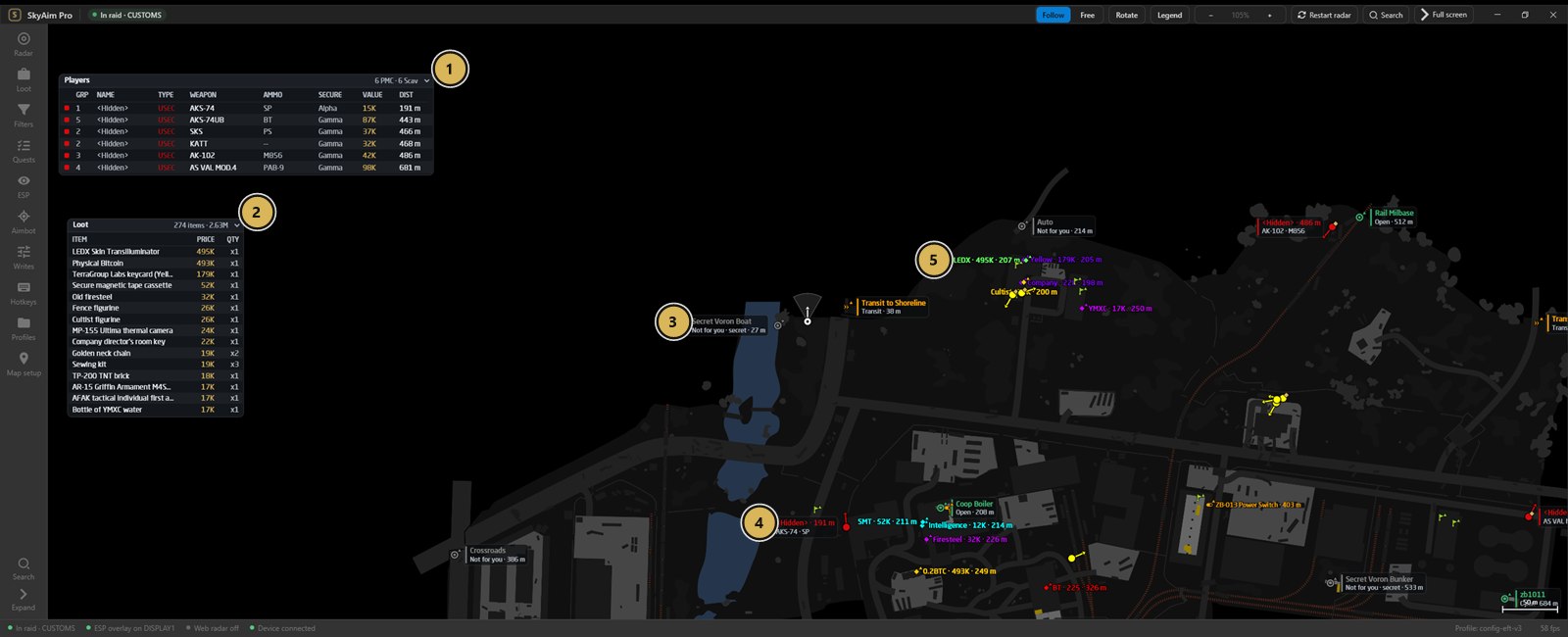
- Six PMCs listed the moment the raid starts
- The most valuable loot: LEDX 495K, Physical Bitcoin 493K
- Secret exfils marked
- Enemy PMC with weapon and ammo
- LEDX on the map with price and distance
Command bar#
Above the map: Follow / Free, Rotate, Legend, zoom − / +, Restart radar, Search and Full screen. It stays visible in full screen so you can always get back. Details: Radar.
Side panel and rail#
The rail on the right of the panel lists the sections. Click one or use its shortcut.
| Section | Shortcut | What is in it |
|---|---|---|
| Radar | Ctrl 1 | Radar display, players and map objects, monitor and resolution, web radar |
| Loot | Ctrl 2 | Loot display, prices, quick filters, containers |
| Filters | Ctrl 3 | Loot filter groups |
| Quests | Ctrl 4 | Quest helper and the tracker website |
| ESP | Ctrl 5 | Fuser overlay, line of sight, widgets |
| Aimbot | Ctrl 6 | Device aimbot |
| Writes | Ctrl 7 | Memory writes and chams |
| Hotkeys | Ctrl 8 | Key bindings |
| Profiles | Ctrl 9 | Saved configurations, import and export |
| Map setup | Ctrl 0 | Map offset and scale calibration |
Colours are not a section of their own: every swatch sits next to the setting it colours (see Colours). Drag the splitter between the map and the panel to resize it. Collapse (or Esc) hides the panel and gives the radar the whole window; Pop out shows the current section as a floating panel over the map. Expanded and collapsed groups inside a section are remembered.
Status bar#
At the bottom: the raid state, the active profile name, the radar frames per second, and short status lines such as Line of sight: on or the aimbot's locked target.
Legend#
Press L at any time. It lists every player style (USEC, BEAR, scav, player scav, raider, boss, teammate, focused, dangerous, carrying loot) and every object marker, plus the controls below.
| Marker | Meaning |
|---|---|
| Dot with a line | A player; the line shows where they look, its length is Aim line length |
| Diamond | Loose loot; larger and coloured for valuable loot |
| Square | Container |
| Cross | Corpse |
| Flag | Quest item or quest spot |
| Exit arrow | Exfil: open, pending or closed by colour |
| Transit | Transit to another map |
| Blast | Grenade, with blast radius if enabled |
| Door | Locked door (key shown on the label) |
| Up / down arrow next to a dot | Player above or below your floor |
Mouse controls on the map#
- Right-click a player: mark or unmark as teammate. Teammates are shared with the web radar.
- Ctrl + right-click: focus a player (highlighted until you unfocus).
- Double-click a streamer: open their stream in the browser.
- Drag to pan in Free mode, scroll to zoom.
Check the FAQ and the launcher message list first. If that does not solve it, send the publisher your newest file from output\Logs (or launcher-update.log for launcher problems).